


Personalización

Ajusta tu experiencia

MGPanel Documentation

MGPanel is a all-in-one platform for creating and managing websites with a fully integrated CRM, keeping each brand or customer in their own workspace. From a single dashboard, you can design pages, manage sales and inventory, collaborate with your team, and support yourself on Emyi to receive contextual guidance in any module without interrupting your workflow.


Quick Access

Table of Contents

Novedades

Todo en uno Web + CRM - Olvida las herramientas dispersas.

El módulo de Novedades centraliza anuncios de la plataforma y actualizaciones de tu cuenta en un solo lugar dentro de MGPanel. No requiere configuración avanzada, solo mantenerse al día con la información que MGPanel pública para el equipo.

1. ¿Qué encontrarás en Novedades?

  • Actualizaciones de la plataforma (lanzamientos, mejoras y correcciones).
  • Avisos importantes sobre tu cuenta (recordatorios, cambios de plan, integraciones).
  • Mensajes destacados del equipo de soporte o del partner que gestione tu cuenta.

Todo se muestra en una lista cronológica, con la más reciente arriba. Puedes identificar rápidamente el tipo de anuncio por el ícono: los mensajes de la plataforma llevan el logotipo de MGPanel y los mensajes de tu cuenta muestran las iniciales del autor.


2. Cómo navegar el módulo 🆕

  1. Accede desde el menú lateral → Inicio → Novedades.
  2. Recorre la lista lateral: cada entrada muestra título, fecha y origen.
  3. Haz clic en una novedad para ver el detalle completo a la derecha.
  4. Si hay muchas novedades, MGPanel cargará las más recientes y podrás seguir navegando sin perderte.
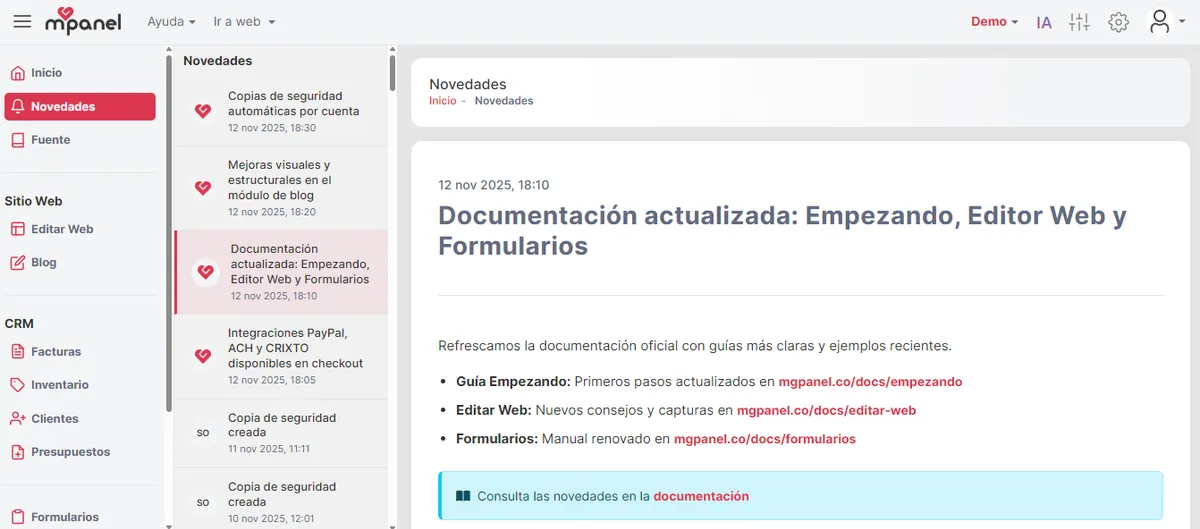
Seleccionando una novedad y leyendo el detalle

3. Consejos rápidos

Para dueños de negocio y marketing

  • Revisa Novedades al iniciar tu jornada para no perder actualizaciones críticas.
  • Comparte internamente los anuncios importantes (ej. cambios de funciones, promociones futuras).
  • Usa la información para planificar campañas o comunicar mejoras a tus clientes.

Para desarrolladores y equipos técnicos

  • Mantente al tanto de cambios de infraestructura, APIs o integraciones anunciadas en esta sección.
  • Si una novedad incluye enlaces técnicos, sigue las instrucciones para anticipar ajustes en tu código.
  • Coordina con el equipo de soporte cuando se anuncien mantenimientos programados.

4. Preguntas frecuentes

PreguntaRespuesta
No veo novedades nuevasVerifica que tu cuenta esté activa y actualiza la página. Si no hay mensajes, MGPanel mostrará un aviso indicando que no hay novedades disponibles.
¿Puedo crear mis propias novedades?Por ahora el módulo es informativo; el equipo de MGPanel gestiona la publicación.
¿Cómo me entero de un anuncio urgente?Además de Novedades, el equipo puede reforzar avisos urgentes con correos o notificaciones internas.

COMPARTIR

FAQs

MGPanel is a platform for creating and managing websites with integrated CRM. It's meant for business owners, marketing teams, and developers who need to work with multiple accounts from a single dashboard.

An account is the project or business (website + CRM). A user is the person who accesses the dashboard. The same user can have access to multiple accounts with different roles.

From the Users module you can invite by email and assign a role (Owner, Administrator, Developer or Editor). Each role defines what you can view and modify within the account.

Changes are published from the Edit Web module. If you have auto-publish turned on, they're reflected when you save. If not, you'll need to request or confirm the post based on your account settings.

Yes. MGPanel is multi-account: you can create and manage multiple accounts and switch between them from the Accounts module without mixing data.

Create the form in the Forms module and then use its shortcode within a page of the Website module. The form is automatically rendered on the site.

Products are created in Inventory and used in Invoices or Estimates. For payment methods, activate a gateway from Integrations and fill in the required credentials.

Use the preview from the editor or open the site's public URL. If it doesn't appear, check the publishing status and clear your browser's cache.

You can ask emyi from the dashboard or open a ticket in Help → Report a bug. Include screenshots and the account name to speed up support.

MGPanel maintains snapshots and backups based on your account settings. Review Settings to see the status of backups and versioning.